Forum

ASSIST, AMERICA'S ARMY COMMUNITY - RELIVE THE GLORY DAYS OF AMERICA'S ARMY 2.5

Show Posts

This section allows you to view all posts made by this member. Note that you can only see posts made in areas you currently have access to.


Messages - Koden

Pages: 1 ... 115 116 [117] 118 119 ... 131
1741
Honor Claims / Re: pit-23
« on: Sunday, February 05, 2012, 18:53:27 PM »
Very very little info. You should provide a screenshot or similar proof.
http://battletracker.com/playerstats/aao/812911/pit-23/

I remember about you anyway, Pit. Old Chicken's Farm time :)

1742
For anyone feeling like starting convert a map, i strongly suggest OldTown, it's a very interesting layout with both open spaces and beautiful interiors, almost no meshes missing (just 2 in the whole map), most of the work is just retexturing which anyway is much better and faster than importing and placing meshes.

This is open to everyone, so if you are totally new to this kind of approach, read Spanky's guide about the namespace converting.

http://aao25.com/maap/2-8-map-converting/

here you can find the map code - use Notepad++ to open and edit the file

SMU_GH_SFOldTown code  -> http://dl.dropbox.com/u/5875434/maps/OldTown.txt

Notepad++ Download -> http://notepad-plus-plus.org/download/v5.9.8.html


p.s. didn't found many visuals to show you the map, but theres a little video.

[youtube]http://www.youtube.com/watch?v=uyfnQ1ve69s[/youtube]


1743
General Chat / Re: develop radar
« on: Sunday, February 05, 2012, 13:36:14 PM »
its shit. unrealistic. go play bf or cod. ty

-.- deeply explained opinion as usual. Even Red Orchestra 2 has his own map with objects and spotted enemies on it. And you can't blame RO2 for being unrealistic since its aimed to be a WW2 simulation!


1744
General Chat / Re: develop radar
« on: Sunday, February 05, 2012, 08:51:29 AM »
In a real war you usually don't have a radar either, I think it was a very unrealistic addition to the game.

In a real war you have other instruments, so even if a Voip tool would be the best and realistic add for playing this game, not every player has a microphone. Obviously players with no microphone would only listen with lesser chance to partecipate. But i think i already wrote another post above about it.

I'm just stating things because i see some thinking how unrealistic is the radar, but in the end it is a visual solution for providing an easier teamwork gameplay. And it is very immediate.

1745
Honor Claims / Re: Honor Claim Forzaa
« on: Sunday, February 05, 2012, 05:48:56 AM »
I don't want to mess up my old stats. Besides, the honor I had there was from a 2nd account.

Your honor level has to be updated on the correct and related account to prevent any possible mismatching attribution. If you have switched between different tracked AA accounts in a certain point in time, that's another matter that however doesn't relate with honor claims as it's not possible to precisely determinate where account-A points ends and when account-B starts.

1746
Turned this into a sticky, this is fantastic. Thanks Koden!

Ty, a lot of this couldn't have been find out and written down without your help. And i have to wrote another part that should fill the circle of converting a map from 2.8 resources (and i had to ask you a couple questions, pm'ing).

1747
mAAp Project / Re: rummage v7 bug
« on: Saturday, February 04, 2012, 18:32:51 PM »
No. Take the G out.

Agree, i don't think it was there in the original version, and it's an unfair advantage as you can blow part of other team early at the beginning.

1748
Once we start converting 2.8 maps there will a share of 2.8 assets available as part of the mAAp pack (or at least it is what the idea is, the amount of files might start to became more consistent and so it might need to belong to a different package).

Updating with more details and a pretty important note.

Quote
IMPORTANT NOTE! You need to place the static mesh you want to export at the very axys origin, otherwise once imported in AA editor it might even fall out of the working area. To do this, select it, go to modify -> center pivot. Then, click on the icon with the arrow close to window right end, and select Absolute Transform, and type 0 in each of the 3 nearby boxes, and press enter. Your object will be now placed at the axys origin.


1749
few maps i would love to see converted:

  • Rummage
  • Floodgate
  • SF Refinery
  • SF Old Town

OldTown seems very very interesting, ill try taking a look at that, of course im already working on other maps but if there's other people willing i can surely write the remaining part of the guide that talks about map converting *wink wink*

p.s. good news, OldTown seems to have only 2 M_AAO package staticmeshes (but it still
has 836 T_AAO class ones, in comparison to t_AA2 ones). AAO tagged assets are the one missing from 2.5, usually. That means there should almost no need to convert meshes but you would have to do a lot of retexturing job.

1750
Yea I just couldn't read the whole thing either lol. But I trust Koden. :)
+1 for Skrewy.

Gonna add images to make things more easier to understand, it can be confusing to have to image what the work into Maya is without actually having worked on it. Also adding a couple thing i reminded.

Edit: done, now i think it's clearer, might add some other parts later (about maps general converting).

1751
Edited for disclaimer - February 2015: this is an old guide not longer being updated, some of the tools used were updated by their authors, and therefore things might differ.

As of lately messing with America's army editors (yes i mean both) has given some good results, so i thought about posting a guide i made, for converting 2.8.5 game assets to 2.5.

----------------------------------------------------------------------------------------------------------------------------

Guide for converting game assets from America's Army 2.8.5 to America's Army 2.5

Please keep in mind that the assets you can import are sounds, static meshes and textures. While sounds and textures will be a more simple matter, static meshes will be exported from the original files to a .obj format.

.Obj is a really handy format, because you will find plenty of 3D modeling programs that will let you import the static mesh model with success (by that i mean achieveing fidelity across the process).
Thanks to the tool we'll be using, sounds and texture will be capable of being imported  with no further processing once extracted.

Software and tools in use:

America's Army 2.8.5 install;
America's Army 2.5 install;

AARE 3.3 - extracting tool (made by ELiZ);
https://dl.dropboxusercontent.com/u/62876385/AARE33.zip

Maya 2010, older version of Maya (not including 8.5) will quite surely be fine too.
3DStudio Max
XSI SoftImage Mod Tool(which happens to be available as free but i have to verify if it works correctly).

Unreal Actor X Plugin for one of the above http://udn.epicgames.com/Two/ActorX.html

America's Army 2.4.1 editor for mapping and importing game assets.


Starting: extracting the assets

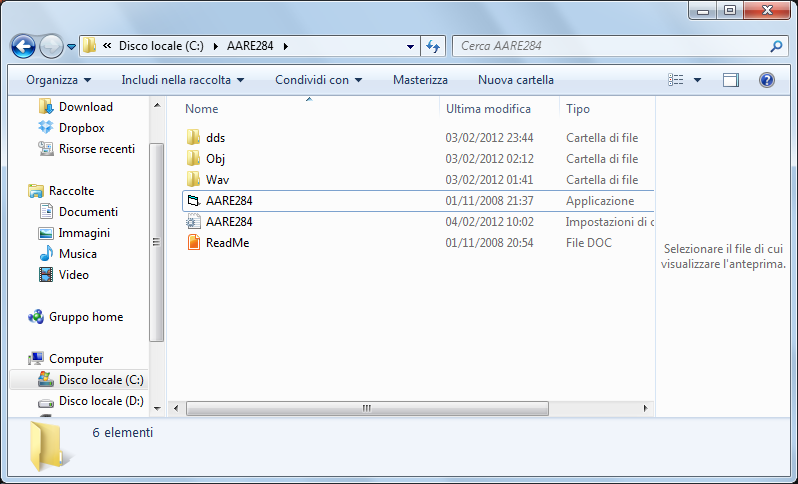
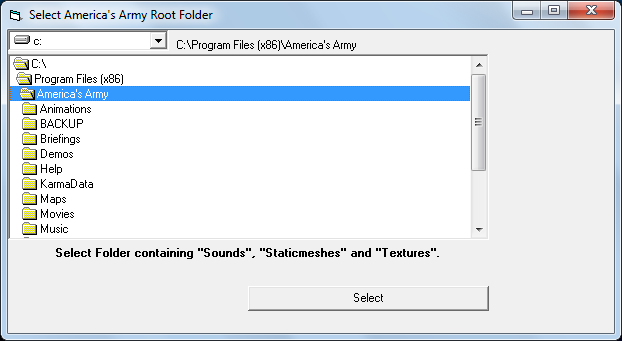
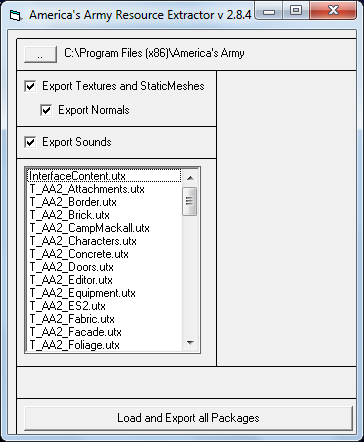
After installing AARE284, open it and type or find your America's Army 2.8.5 folder, click on select, then click load and export all packages. The extracting process will take some time, at least a minute or two.


Converting the static meshes


Now you have 3 folders, with Wav for sounds and DDS for textures. Since those are fine already, let's concentrate on the static meshes. Open Maya (using a different tool you'll happen to have quite different settings for importing and exporting) and click import, deselecting group and "remove duplicate shading networks", and select default references in the below menu.
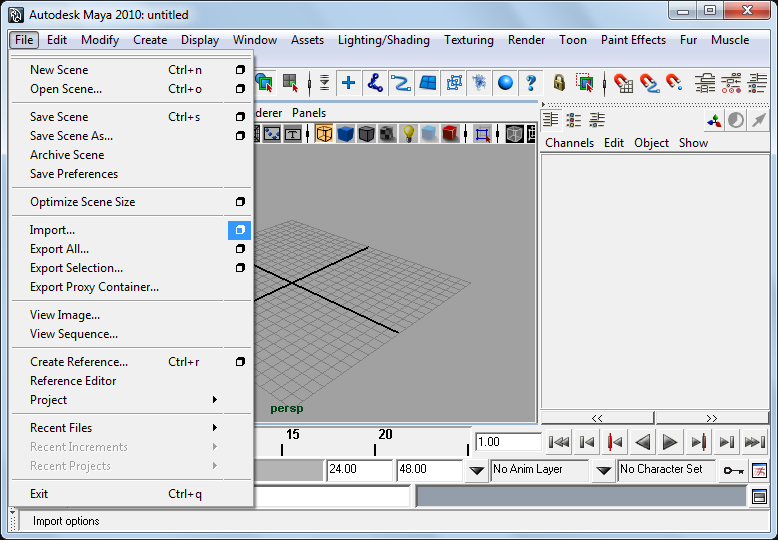
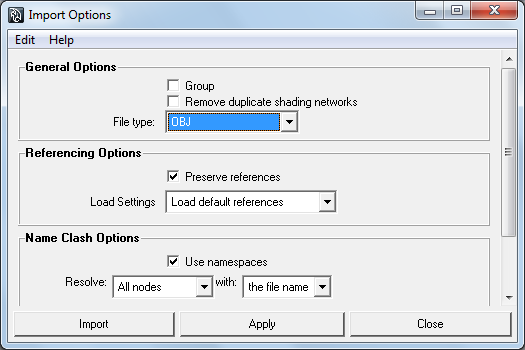


Click import and select the .obj file you want to import in Maya. Now, please note that since what you are importing is an extracted .obj version of a package containing several staticmeshes, you'll have all of these staticmeshes imported in one workspace. This represents a more than fair amount of models and might drive to freezes depending on your hardware capabilities.
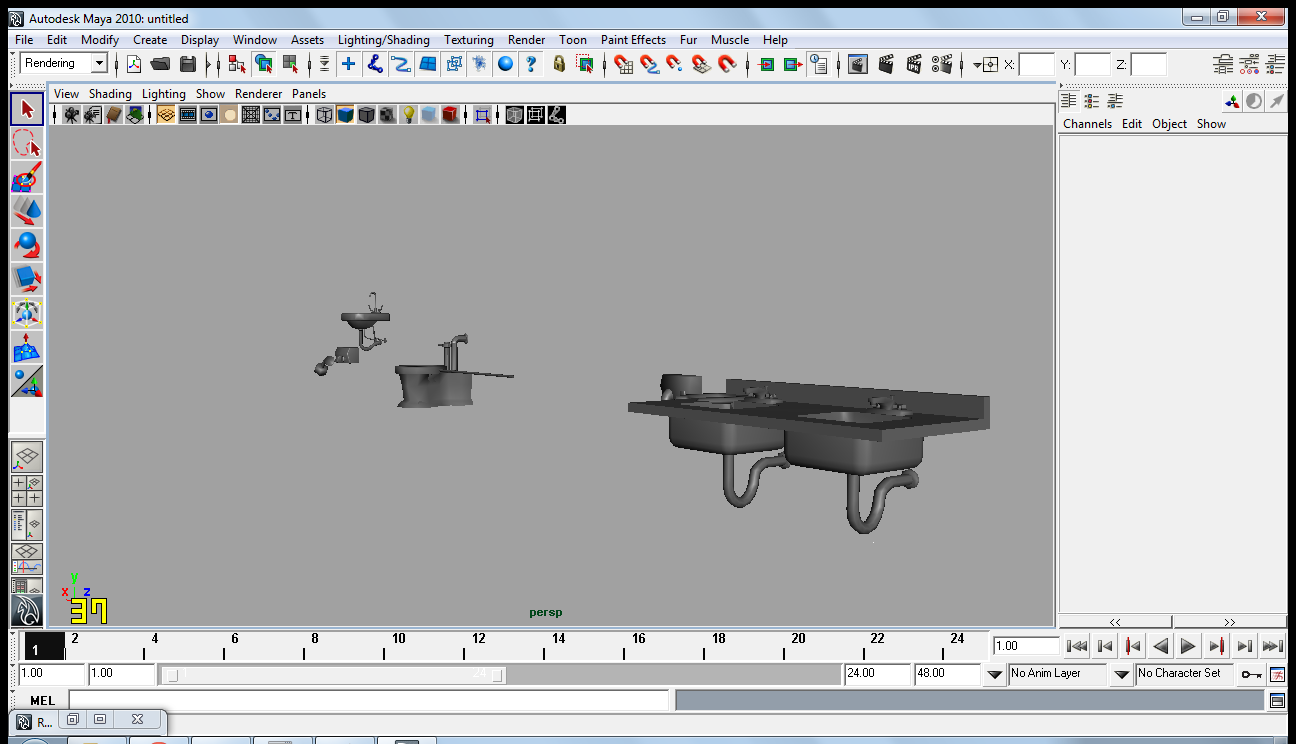


At this point i suggest you to switch to a ortographic view to get a better viepoint (to do that, press spacebar once, and then with mouse over an ortographic view -front will suit- spacebar once again).
Zoom out (mouse scrolling) and move to your right to see the meshes, they will appear are as lined up to the X axys.
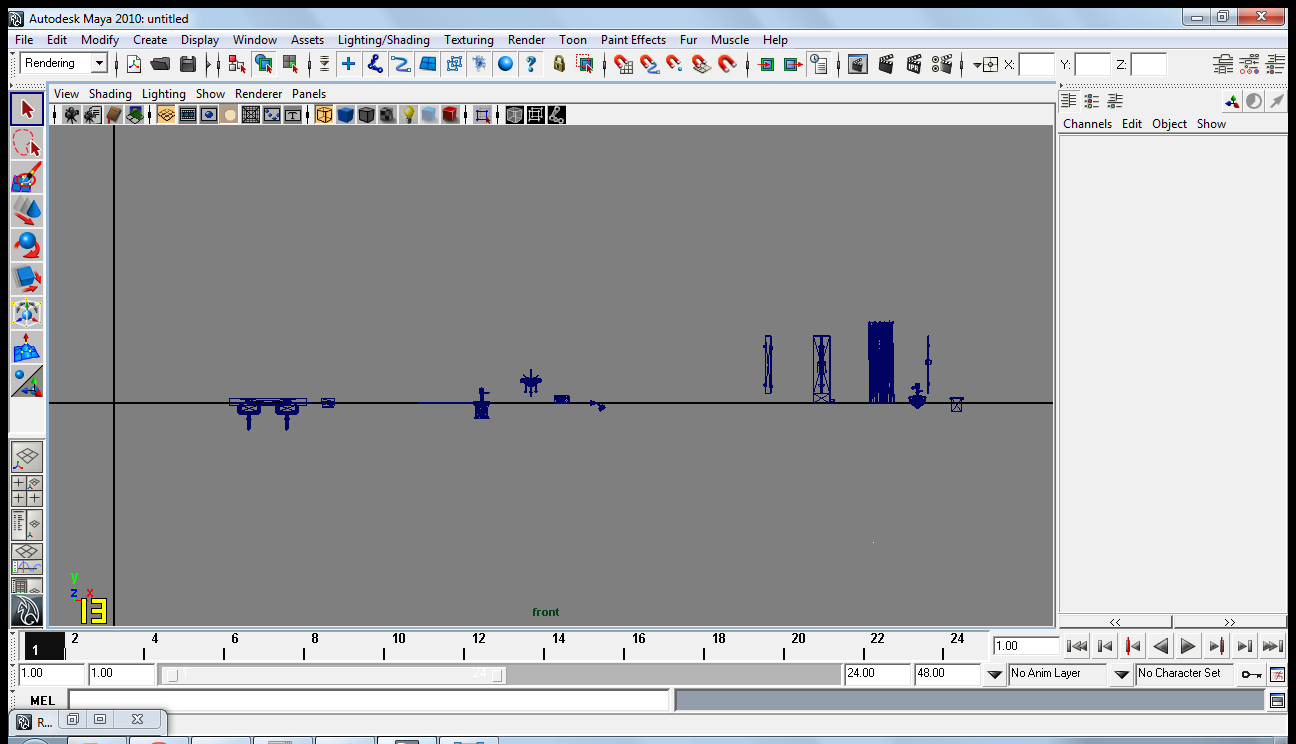


 If you imported a big package you will have probably not least than 60/70 meshes, so you'll have to manually move into the workspace and select the one you want to export, or going to the Outliner editor and look up for the name of the one you want. Do a visual check of the model, you might happen to have a tube protruding from your model or something wierd, so just select the unwanted additional tube/rod and delete it.
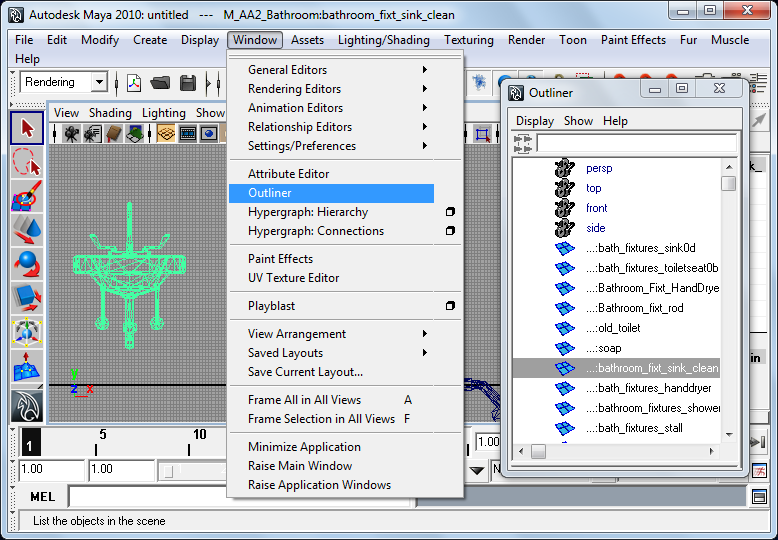
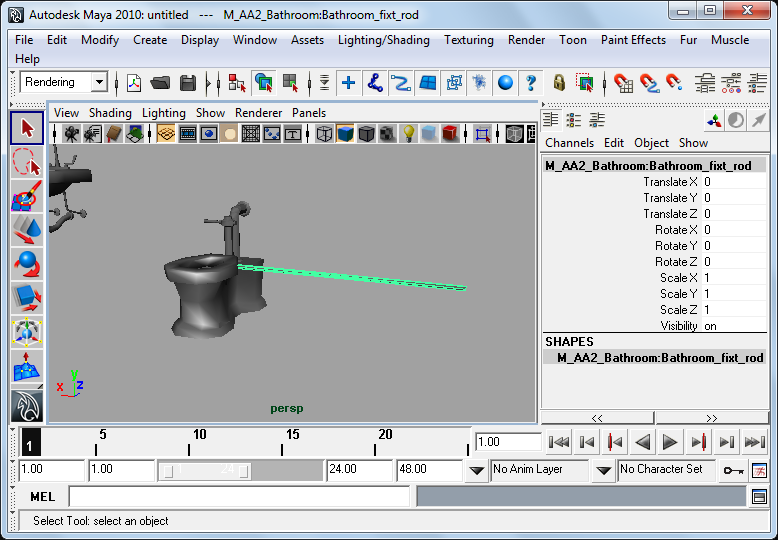


The key point is that if you don't export 1 object at a time, once exported as .ase you will have a unique staticmesh made of the 2 or more meshes you selected. Anyway, if you are willing to convert the whole amount contained in the package, just go to Edit -> Select All.
Obviously this shouldn't be done for packages that go over 10-15mb of size as it will probably take a lot of time (and it might even happen to crash the editor), since in a medium to big package there are more than 80 meshes. Basically, don't waste your time.

IMPORTANT NOTE! You need to place the static mesh you want to export at the very axys origin, otherwise once imported in AA editor it might even fall of of the working area. To do this, select it, go to modify -> center pivot. Then, click on the icon with the arrow close to window right end, and select Absolute Transform, and type 0 in each of the 3 nearby boxes, and press enter. Your object will be now placed at the axys origin.
Note: some staticmeshes gets rotated by 90 degrees on  when exported in the obj.So, if you see a mesh laying over your workspace grid, its likely rotated: rotate by 90 degrees on the X axys to fix the misrotation.


At this point you are ready to export the static meshes, so load the ActorX.mll plugin if you haven't done before. Then, type axmesh in Maya command line (white space with MEL written next to it), and once the window has opened select Selected Items only and Consolidate Output Geometry. Select the output path, and click Export Mesh. Good practises: name your files with the exact name you want them to have when they will became part of a static mesh package.
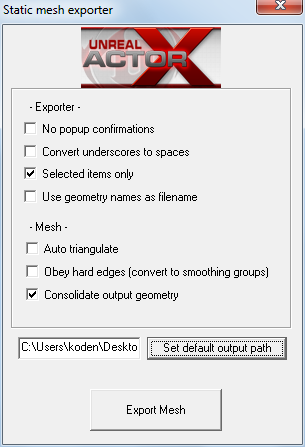


Final step

Launch America's Army Editor 2.4.1, and select the static mesh tab. Go to File, Import and import the file you exported out of Maya. Now remember that if you selected 2 or more meshes in Maya, and then exported, you will find them to actually be as one under one name. Now you can manually add textures to those meshes by right-click-> StaticMeshActor Properties -> display -> skin.
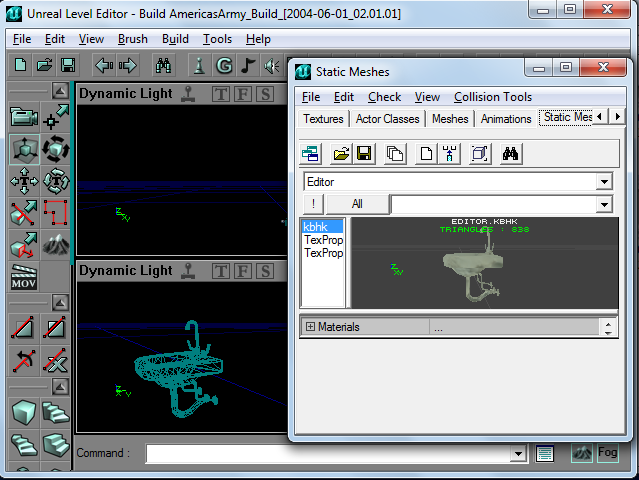


Last but not least, if you use original assets name to get the files you are looking for, remind that:

Quote from: AARE284Author
My process of reading the nametables from America’s Army packages is not perfect, the signs of that is that the objectnames is not 100 % accurate.


Tips (Spanky's): if you take a map and change the file extension from .aao to .usx (unreal staticmeshes packages format) you will be able to use that map as a package of the exact static meshes used in it. Working only for 2.5 maps of course (2.8 maps can't be read straight off 2.4.1 editor but will need a namespace converting aside of the pure assets converting).
Might help if you have issues converting a particular staticmesh, copypaste it to a new empty map, save and try it on.

1752
General Chat / Re: AA Mission Editor
« on: Friday, February 03, 2012, 19:32:37 PM »
is that a fountain in the middle of the road

That specific place is a square in the original Dusk, he made it more open so now it looks like a part of the road from that perspective.

1753
The Lounge / Re: MAC server creating
« on: Friday, February 03, 2012, 16:22:23 PM »
also you could run windows version of 2.5assist server in parallels or vmware.

Yeppers, a virtual machine would work too and won't get him bothered by rebooting to switch OSs.

1754
The Lounge / Re: MAC server creating
« on: Friday, February 03, 2012, 15:54:13 PM »
Unless you have a Powerpc Mac all modern MACs have Intel x86 processors inside, so they can perfectly run Windows. On mac you can keep and use OSX and Windows on the same pc by using Bootcamp.

1755
Media & Art / Re: Just some random sig's & manipulations
« on: Friday, February 03, 2012, 13:47:25 PM »
Those are neat, but when your design a web UI you need to think can i build this. The second one would be so hard to build that i would rage quit.

I think you might design it on Flash, sure it isn't an open solution. I would dare to say that a layout with some tricks to appear visually dynamic without being rotated would appear even more interesting given the more subtle work. Anyway i don't know if it's the font you chosen for the smaller black text (Website opened, contacts added and such) but the letters are slightly misaligned in height to each other. If it's something you planned it's fine otherwise i would rather fix it.

Pages: 1 ... 115 116 [117] 118 119 ... 131

Download Assist

×

Download Game Client

Important: Battletracker no longer exists. However, old Battletracker accounts may still work. You can create a new 25Assist account here

Download Server Manager